Photo Video Maker - InSlide
- 4.7
- Rating
- 10.00M
- Installs
- Free
- Price

 Analysis by App-foxy
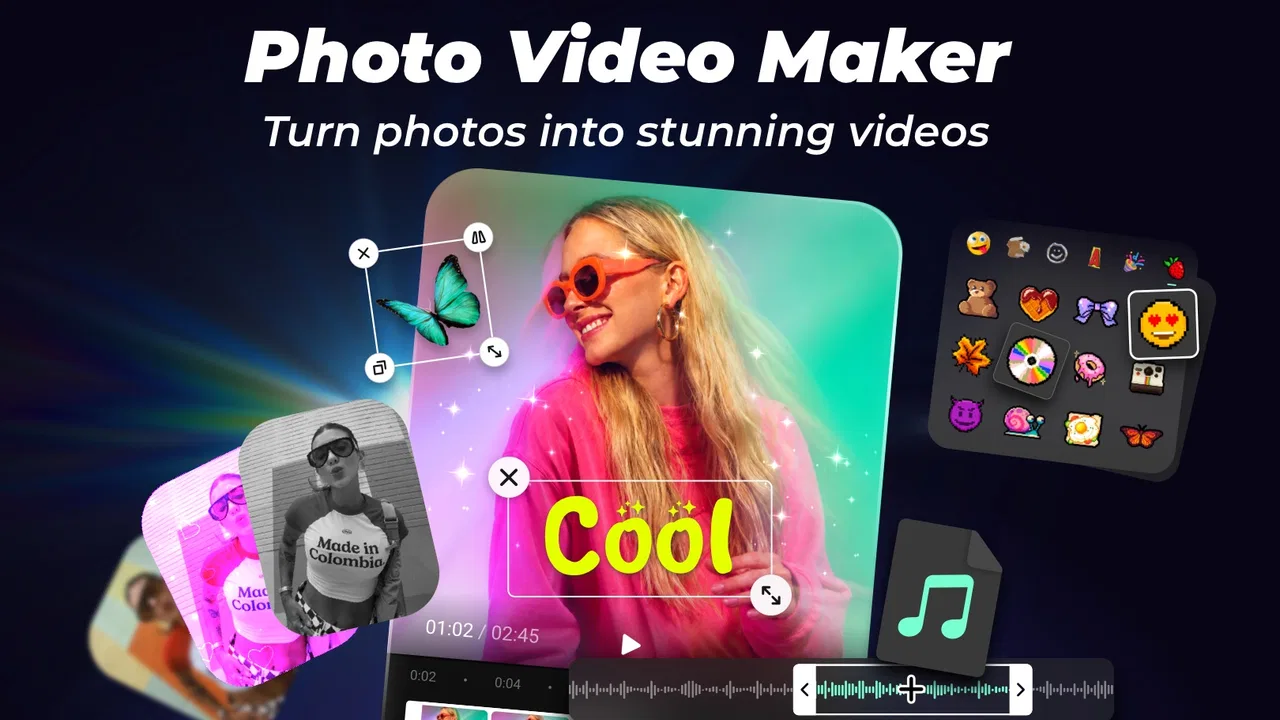
I usually judge a photo-to-video app by a simple question: can I turn a group of pictures into something worth sharing without spending an evening learning an editor? Photo Video Maker - InSlide is built for that exact moment. It sits in the video players and editors category, but its focus is much narrower than a full timeline editor. I use it as a quick way to arrange photos, add music, choose a visual style, and produce a slideshow that feels more deliberate than a basic camera-roll montage.
That focus is both its appeal and its boundary. If you want a fast birthday recap, a travel memory, a short family greeting, or a social post assembled from still images, the app makes sense. If you need detailed control over individual frames, advanced audio mixing, or a complex multi-layer project, I would look elsewhere. My experience is that InSlide works best when speed, templates, and a polished starting point matter more than complete creative control.
How I Decide Whether InSlide Fits
Before choosing any slideshow maker, I look at four things: how quickly I can begin, how much control I retain, whether the result looks consistent, and whether the cost stays reasonable for occasional use. InSlide performs strongest on the first and third points. It is designed around photo videos with music and templates, so I do not have to construct every transition from scratch. That is useful when the content is already selected and I mainly need help giving it rhythm.
You May Also Like

 Blood Strike: 2.5 Anniversary
Blood Strike’s Loadouts Turn Every Drop Into a Tactical Gamble
A close look at Blood Strike’s custom loadouts: how fast access to signature weapons reshapes its battle royale rhythm, rewards preparation, and narrows the gap between fights.

 Pandora - Music & Podcasts
Pandora’s Music Is Easy to Start, but Harder to Recover
Pandora’s strength is its low-effort path from a seed to a station. Its weak spot is how much confidence it asks you to place in connection, setup, and quiet recovery.

 8 Ball Pool
 Is Built on Rivalries, Rematches, and Routine
A close look at the rivalries, rematches, shared routines, and unanswered safety questions that turn a quick pool match into a persistent mobile community.

 Samsung Music
’s Quiet Strength Is Playing What You Already Own
Its reach comes less from spectacle than from dependable access to a personal library. That simplicity is both the app’s strongest retention engine and its ceiling.

 AccuWeather: Weather Radar
AccuWeather Review: A Quick, Clear Forecast for Everyday Decisions
For everyday plans, the best forecast is the one you can understand quickly. AccuWeather makes rain timing, radar, and local conditions easy to act on, with a few trade-offs.

 Hill Climb Racing
Why Hill Climb Racing Still Turns Crashes Into One More Run
A tiny car, a bumpy hill and one more upgrade: Hill Climb Racing keeps resurfacing because its simple chaos makes every near-miss feel personal.
More From Our News Desk



The app is free to install, and its content rating is Everyone, which makes it approachable for a broad range of users. Daily AI Studio is the developer behind it. The current version is 2.1.2.4, and it runs on Android 8.0 or newer. Those details matter if you are using an older phone: the minimum system requirement is not especially demanding, but checking compatibility before preparing a large project can save time.
Its public reception also suggests that the basic idea is connecting with many people. InSlide has a 4.8 average from around 152 thousand ratings, with about 1.9 thousand written reviews, and it has passed 10 million installs. I would not treat popularity as proof that every workflow will suit me, but it does indicate that this is not an obscure experiment with an untested concept.
The more useful question is what kind of creator you are. I would choose this app if I wanted a finished-looking result quickly and was happy to work within a template-led process. I would hesitate if I wanted to fine-tune every transition, cut music precisely, animate separate objects, or maintain a long project with many editable layers.
The first workflow: from camera roll to a shareable memory
A realistic use case is a weekend trip. I might return with dozens of pictures, but only a smaller group belongs in a short video. InSlide is most effective when I first make that selection outside the editing screen. I remove near-duplicates, blurry shots, and pictures with awkward framing before importing anything. This small step has a bigger effect on the final result than endlessly changing templates later.
Once the photos are ready, I can treat the app as a visual organizer. The order should tell a story: arrival, main activity, people, detail shots, and a closing image. A template can add movement and consistency, but it cannot repair a confusing sequence. I found that choosing fewer, stronger photos usually produces a more watchable slideshow than filling every available space simply because the images are available.
Music changes the feeling of the same collection. A lively sequence can make a casual outing feel celebratory, while a slower choice suits a family remembrance or a quiet travel diary. I would preview the complete video before sharing rather than judging each photo in isolation. A transition that looks attractive once may feel repetitive when it appears throughout the whole piece.
Why templates are more useful than they first appear
The obvious advantage of templates is speed, but their less obvious benefit is decision reduction. A blank editor asks me to decide timing, movement, visual balance, and transitions independently. InSlide gives me a visual direction first, which is helpful when I know what I want to say but do not have a strong editing vocabulary.
There is a trade-off. A template can make unrelated photos feel like part of the same story, yet it can also impose a mood that does not fit the material. I would not use a dramatic style for a simple school project or a playful family greeting unless the images support it. The best results come from treating templates as starting points rather than automatic guarantees of quality.
One practical technique is to test the same photo set with two contrasting styles before spending time refining the sequence. If one template makes faces too small or turns important images into brief flashes, discard it early. This is faster than trying to force a poor match into a finished video.
Where the app wins against ordinary alternatives
Compared with making a slideshow manually in a general video editor, InSlide gives me a shorter path from still images to a presentable result. A traditional editor is better when I need a precise timeline, but that precision also creates more work. For a quick greeting or a small social clip, I may not want to adjust every cut by hand.
It also has a clearer purpose than a basic gallery slideshow. A gallery can display pictures in sequence, but InSlide is aimed at turning them into a designed video with music and a chosen visual treatment. That distinction matters when I want the result to feel made rather than merely played.
Against a full-featured mobile editor, its strength is approachability. I can concentrate on selecting images and choosing a mood instead of learning a large set of tools. This makes it a sensible choice for people who are uncomfortable with editing software, parents preparing a quick family clip, or anyone who wants to publish a memory without becoming the designated video editor in the group.
Its real advantage is not maximum control; it is reducing the number of decisions between a photo folder and a finished slideshow. That is a meaningful benefit, especially for occasional creators who value momentum more than technical depth.
Three details that improve the result
First, I would prepare images with the intended orientation in mind. A template may crop a landscape photo differently from a portrait photo, and an important face can disappear near the edge. Checking the crop preview for key images is worth the extra moment. If the app offers a way to reposition a photo inside a frame, I would use that selectively rather than trying to rescue every image.
Second, I would build around visual changes, not just chronological order. A close-up after a wide landscape can create a natural sense of movement. Several similar group shots in a row may make the video feel static even if the transitions are attractive. InSlide can give the sequence style, but I still need to provide visual variety.
Third, I would keep a separate copy of the original photos and avoid treating the exported video as the only version of the memory. A slideshow is a presentation, not an archive. Keeping the source images means I can rebuild the project later with a different order or style without losing the original material.
Music, pacing, and the point where automation stops helping
Music is one of the reasons to use a dedicated photo-video app, but it can also expose its limits. A template may make the montage feel energetic while the selected track has a completely different tone. I prefer to decide whether the video is meant to be funny, sentimental, elegant, or energetic before choosing the soundtrack. That single decision narrows the options and prevents a visually polished but emotionally confused result.
I also pay attention to the opening and closing images. The first frame should explain the subject immediately, while the final frame can provide a sense of completion. If the app’s automatic arrangement places an unrelated picture at either end, I would manually reorder the selection before changing the template. This is a small workflow adjustment, but it makes the video feel intentional.
InSlide is not the right tool for a project where the music must hit exact spoken cues or where every cut needs to land on a particular beat. For that, a timeline-based editor is more suitable. The same applies to interviews, tutorials, product demonstrations, and videos that depend on recorded narration. A photo slideshow can support those projects as an opening or closing element, but it should not replace an editor designed for precise video production.
Where another kind of app may fit better
Someone choosing between InSlide and a conventional mobile video editor should consider the source material. If the project consists mainly of photographs and the desired outcome is a compact montage, InSlide is the more direct choice. If the project combines video clips, voiceover, captions, layered graphics, and exact timing, a general editor will probably be worth the additional learning.
A presentation tool may be better for a business meeting or classroom lesson because it emphasizes readable text and controlled slide order. A photo collage maker may suit someone who wants a single still image rather than a moving sequence. A social network’s built-in editor may be enough when the video is intended only for one platform and does not need to be reused elsewhere.
I would also avoid choosing InSlide solely because templates promise a quick result. Template-driven apps can make many projects share a similar visual language. That is not necessarily bad for a personal greeting, but it matters if I am trying to create a distinctive portfolio piece or a carefully branded presentation. In those situations, starting with a blank timeline gives me more room to develop an individual style.
Free access and the cost of switching
InSlide is free, but it includes in-app purchases ranging from $1.49 to $23.99 per item. For me, that means the sensible approach is to begin with a small, low-stakes project and learn which parts of the workflow are available without paying. I would not start by selecting a paid-looking style for an important event before understanding how the app handles the final output and editing process.
The cost is not only financial. Switching from a simple template app to a more advanced editor requires time. I may need to learn a timeline, understand layers, manage audio, and become comfortable with more settings. InSlide saves that learning cost when the project is straightforward. On the other hand, if I already know a full editor well, moving to a template-led workflow may feel restrictive rather than efficient.
A useful test is to create one short project that represents the kind of work I normally do. Use a modest set of photos, check the crop on faces, preview the music, and see whether the available controls are enough. If the result feels close but not quite right because I cannot adjust a specific element, that is a sign I need a more open editor. If the result is already suitable, the simpler workflow is probably the better value for my time.
People also often wonder whether a free app is appropriate for a private family video or a public post. The answer depends less on the label “free” and more on the final workflow I need. For a casual share, it may be entirely adequate. For a client deliverable, a school assignment with strict presentation requirements, or a project that must be revised repeatedly, I would evaluate the editing controls and any purchase prompts before committing to it as my main tool.
Who should use it, and who should skip it
I would recommend InSlide to someone who has a folder of photos and wants a finished video without wrestling with a complicated interface. It is especially fitting for birthdays, holidays, anniversaries, small celebrations, travel recaps, and quick messages where the emotional value comes from the images rather than elaborate production.
It is also a good choice for an occasional creator who does not want to remember a complex editing process months later. The template approach can make the next project feel familiar, and the app’s focus keeps the task from expanding into a full production session.
I would suggest skipping it as a primary editor if you need detailed sound design, synchronized dialogue, fine-grained motion control, or a large number of video clips. I would also look elsewhere if consistent originality is essential and the available template language does not match your style. In those cases, a conventional editor may take longer but give me the control I actually need.
My recommendation after using the workflow
Photo Video Maker - InSlide earns a place as a focused slideshow tool rather than a replacement for every mobile video editor. I like it because it understands a common need: I have photos, I want music, and I want the result to feel finished quickly. The combination of templates and a photo-first workflow removes much of the setup that can make ordinary editing feel unnecessarily heavy.
My recommendation is strongest for personal projects with a clear emotional purpose and a limited amount of material. Select the photos carefully, check the crop on important faces, choose a style that matches the mood, and preview the complete sequence before sharing. Those habits matter more than adding every visual effect available.
For demanding editing, I would choose a timeline-based alternative. For quick photo memories, I would start with InSlide because it keeps the process focused. The app is free to try, suitable for Everyone, and supported by a large user base, while optional purchases give the workflow a possible cost beyond the initial installation. If your priority is a polished slideshow with minimal editing friction, this is the kind of app I would recommend trying first.
In my view, Photo Video Maker - InSlide succeeds by staying close to one useful job instead of pretending to be a complete production studio. That makes it less suitable for technical creators, but more comfortable for everyday users who simply want their photos to tell a story.
FAQs for Photo Video Maker - InSlide
01What features does Photo Video Maker - InSlide offer?
Photo Video Maker - InSlide provides a range of features including the ability to create slideshows with photos and videos, add music, apply various filters and effects, and customize transitions. Users can also edit photos directly within the app and export the final video in high quality, making it a versatile tool for content creation.
02Is Photo Video Maker - InSlide free to use?
Photo Video Maker - InSlide offers a free version with basic features. However, to unlock advanced features such as premium effects, additional music tracks, and ad-free usage, users may need to opt for in-app purchases or a subscription model. This allows for enhanced customization and a more professional output.
03What are the system requirements for Photo Video Maker - InSlide?
To run Photo Video Maker - InSlide smoothly, your device should have at least Android 6.0 or iOS 12.0. Sufficient storage space is necessary for rendering high-quality videos. It’s recommended to have a device with at least 2GB of RAM to ensure optimal performance without lag during editing.
04How user-friendly is Photo Video Maker - InSlide for beginners?
Photo Video Maker - InSlide is designed with an intuitive interface, making it accessible for beginners. It offers step-by-step guides and tutorials to help new users navigate the app's features. The drag-and-drop functionality and pre-made templates make creating professional-looking videos straightforward and hassle-free.
05Can I share my creations directly from Photo Video Maker - InSlide?
Yes, Photo Video Maker - InSlide allows easy sharing of your video creations. Once your video is complete, you can directly share it on social media platforms like Instagram, Facebook, and YouTube, or save it to your device. The app provides multiple format options to ensure compatibility with various platforms.
Pros
- User-friendly interface for easy navigation.
- Wide range of transition effects available.
- Supports HD video export options.
- Includes music library for background tracks.
- Allows easy sharing to social media platforms.
Cons
- Limited free templates in basic version.
- In-app purchases can be pricey.
- Occasional ads interrupt editing.
- Requires internet for most features.
- Limited customization of text styles.

Photo Video Maker - InSlide
Gallery